Free, no account, no ads.
The shopping list
belongs to everyone at home.
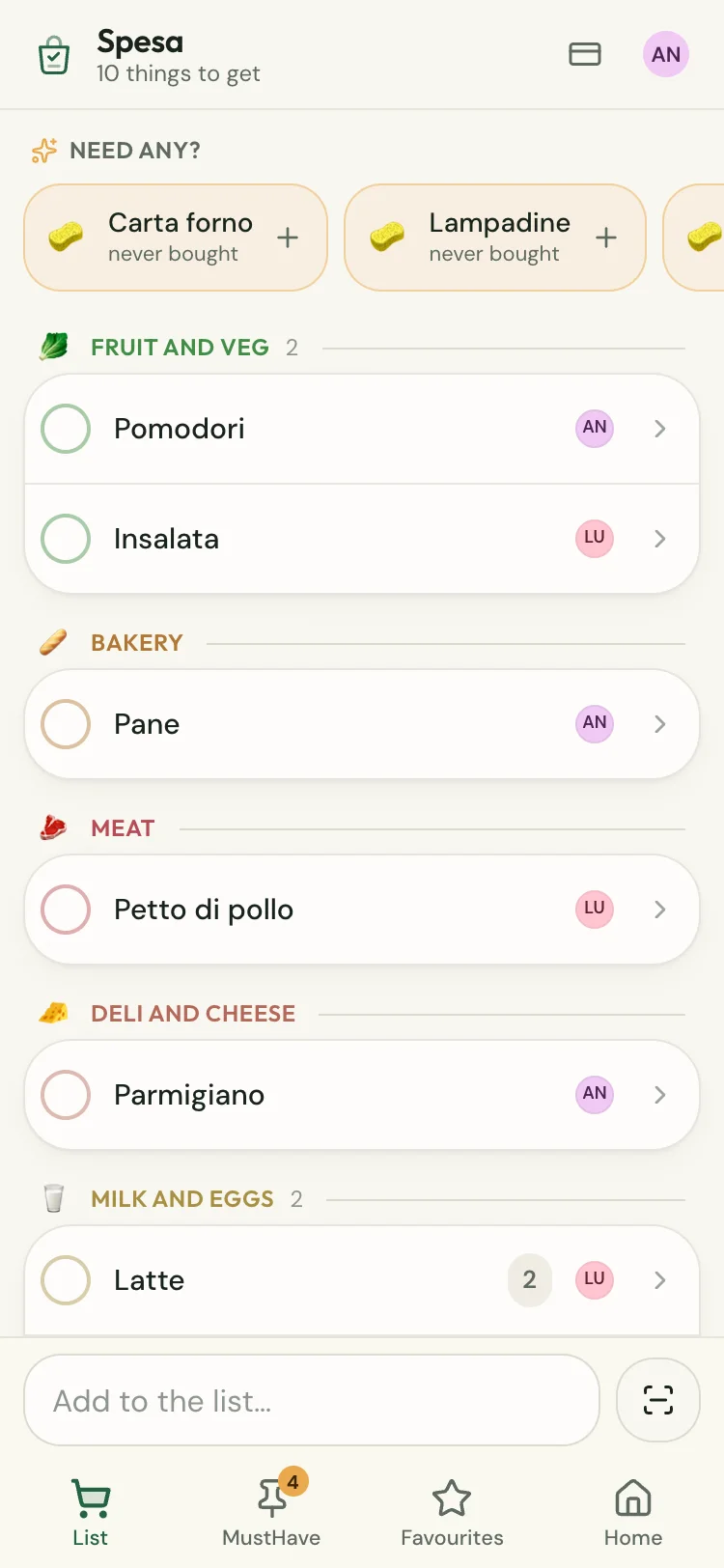
Add the milk from the sofa and whoever is at the supermarket sees it on their phone. No email needed.
Getting started
Create the household
The name of your home, your name, and that’s it. Ten seconds.
Pass the code on
You get a code like ABCD-EFGH. Anyone who has it gets in from their own phone and finds your list waiting.
Do the shopping
From then on there’s one list. If somebody ticks off the bread, it disappears from your phone too.
Nothing gets forgotten again.
The thing you always forget, it remembers. Then you put the bags down and nobody has to ask who was supposed to get the coffee.
It files things in the right aisle
Type «tomatoes» and it goes to fruit and veg. The list follows the aisles, so you start at the produce and reach the tills without doubling back three times.
MustHaves
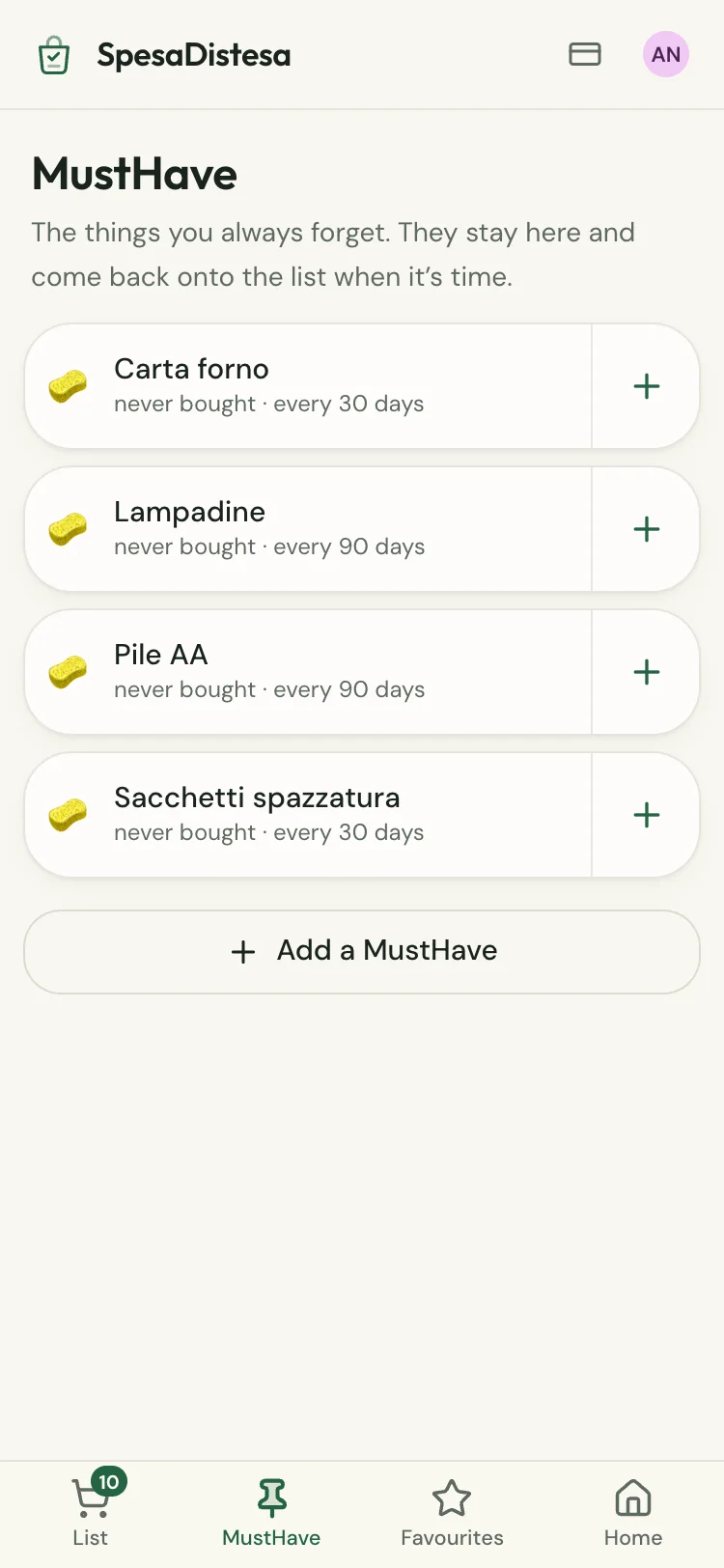
Bin bags, light bulbs, the coffee for the pot. You add them once and say how often they run out: when the time comes, they’re waiting at the top of the list.
It learns what you buy again
After a few shops it knows you get coffee every three weeks, and that the passata goes in the basket with the pasta. It reminds you when you open the list.
Loyalty cards
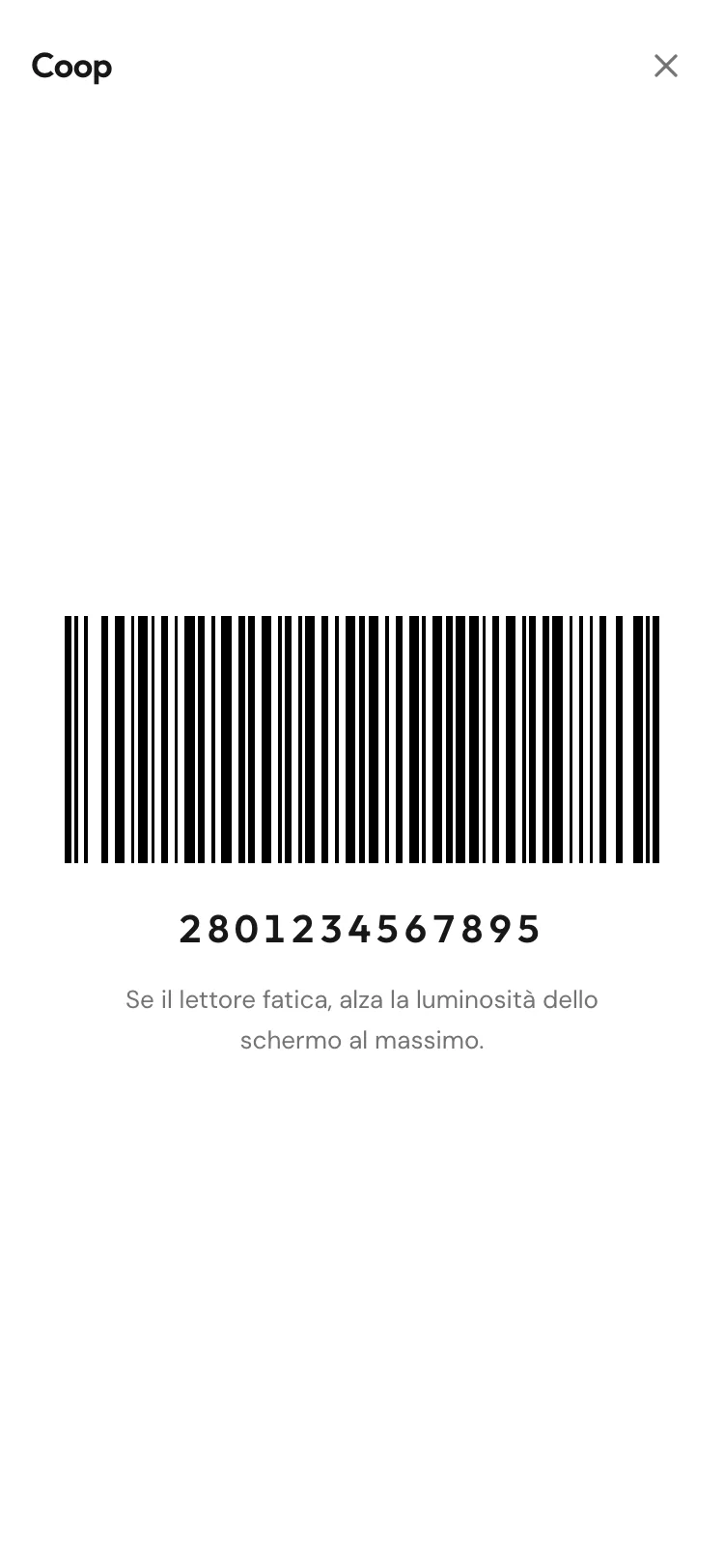
Scan your Tesco Clubcard once and it stays in there. At the till it opens full screen on white, because that’s how the scanners read it first time.
The paper list adds itself
Your phone reads the handwriting on the note stuck to the fridge: Live Text on iPhone, Google Lens on Android. Copy, paste, and the quantities sort themselves out. The photo never reaches us.
You know when someone’s at the shop
The moment they start ticking things off, everyone else gets a notification. That’s your window to add the thing you forgot.
It works with no signal
Down in the basement aisles the phone barely works. The list stays exactly where it was and catches up on its own once you’re back outside.
What it looks like
What it doesn’t do
Better said now.
- No recipes. If you’re after what to cook tonight there are apps made for that, and they do it better.
- It doesn’t show you supermarket offers. Which also means it has no reason to get you to buy anything.
- No ads and no profiling: there’s nobody to sell your shopping list to.
- It doesn’t ask for your email, so it can’t write to you. Change phone and all you need is the household code.
Standard and Pro
Almost everything is free, and stays free. You only pay for more lists and more households, once.
Standard
Free
Forever, with no advertising.
- One household, with everyone who lives there
- One shared shopping list
- MustHaves, favourites, history and predictions
- Loyalty cards, scanner and notifications
- Paste in a handwritten list
Pro
€19.99 once
VAT included. Not a subscription, and it never expires.
- Everything in Standard
- Unlimited lists: groceries, hardware store, pharmacy
- Unlimited households: yours, your parents’, the place by the sea
- Switch from one household to another with one tap
- Follows you to any phone with a personal key, no email and no password
Got a trial code? Type it in the app, under Home → Get Pro: 30 days of Pro for free. When they’re over you go back to Standard without losing anything. For now Pro can only be bought in Italy.
It goes on your home screen, like an app
This is the step almost nobody knows about. SpesaDistesa opens in a browser, but it doesn’t have to stay there: on both iPhone and Android you can drop it onto your home screen. From then on it’s an icon like any other, and tapping it opens the app full screen with no browser bar around it. Nothing to download, no app store involved.
On iPhone there’s one more reason to do it: the notification telling you somebody is at the shop only arrives if the app is on the home screen. That’s Apple’s rule, not our choice.
iPhone with Safari
- 1
Open this page in Safari. If you got here from a link inside another app, look for «Open in Safari»: from there the two taps below really are there.
- 2
At the bottom of the screen tap Share, the square with the arrow coming out of the top.
- 3
Scroll down to Add to Home Screen and confirm with Add, top right.
Android with Chrome
- 1
Open this page in Chrome.
- 2
Tap the three dots, top right.
- 3
Tap Install app. On some phones it’s called «Add to Home screen»: same thing.
 SpesaDistesa
In the end it sits there among your other apps, and the household list is one tap away instead of an address you have to remember.
The questions everyone asks
What’s the difference between Favourites and MustHaves?
Favourites are convenience: the things you add often, kept together so one tap puts them on the list. MustHaves are memory: you write them down once, say how often they run out, and they come back at the top of the list by themselves once enough time has gone by. A favourite you add when you need it; a MustHave comes looking for you.
How much does SpesaDistesa cost?
Using it costs nothing and there are no ads. The only thing you pay for is extra lists and households: one list and one household are free, and anyone who wants several (the groceries, the hardware store, the pharmacy, their parents’ place) moves to Pro for €19.99 once. Pro belongs to whoever buys it and follows them to any phone with a personal key, no email and no password. It is not a subscription and it never expires. Everything else stays free exactly as it is: MustHaves, favourites, loyalty cards, the scanner, history, notifications. Pro can currently only be bought in Italy.
Do I have to get it from the App Store or Play Store?
No, it isn’t in any store. It’s a website: you open it and you’re in. If you’d rather have it among your other apps, both iPhone and Android let you drop it onto the home screen in three taps, and from there it opens full screen like any other app.
Do I need to sign up or give an email address?
No. There are no accounts, no passwords and no emails to confirm. Type the name of your home and your own name, and the household exists: you end up with a code like ABCD-EFGH, which is the only key you need.
How do I share the shopping list with the people I live with?
You give them the household code. They type it on their phone along with their name and find your list in front of them. Inside the app there’s a button that writes the message for you, code included, ready to send on WhatsApp.
How many people can use the same list?
Up to thirty in one household. A couple, a family with grown-up kids or four flatmates all work fine: everyone adds from their own phone and the list stays one list.
If I tick something off, does everyone else see it?
Yes, within a few seconds. If your husband ticks off the bread while he’s queueing, it disappears from your phone by itself. And the moment somebody starts ticking things off, everyone else gets a notification: that’s your window to add what you forgot.
Does it work with no signal, inside the supermarket?
Yes. Down in the basement aisles the phone barely works: the list stays exactly where it was, you can carry on ticking things off, and once you’re back in signal it catches up with everyone else’s on its own.
If I change phone, do I lose the list?
No. The list doesn’t live on the phone: open SpesaDistesa on the new one, get back in with the household code and everything is there, MustHaves and loyalty cards included. The code is on the Home screen of the app whenever you need it, and from there you can save your household card: an image with the code and its QR, to keep in your photos or printed inside a cupboard door. It’s the only key there is: with no account there’s no «forgot my password», and that’s the same reason nobody can read your list.
Can I keep more than one list?
Yes. Alongside the everyday shop you can keep others (the DIY run, the holiday house, Saturday’s party) and switch between them without mixing them up.
Does it work on iPhone and Android?
On both, and on a computer too: it’s a web page, so an up-to-date browser is all it takes. The only difference is on iPhone, where notifications only arrive if the app is on the home screen: that’s an Apple rule, and it applies to any website.
How does it know which aisle something belongs in?
It already recognises the common names, in all four languages: type «tomatoes» and it lands in fruit and veg, «mozzarella» goes with the dairy. The aisles are in the order you walk past them, from the produce to the tills, so you don’t double back three times. If it puts something in the wrong place, move it once and it remembers.
What happens to the things I put on the list?
They stay inside your household and they’re only used to make your list work: to remember that you buy coffee every three weeks, for instance. There are no ads, no profiling and nobody to sell your basket to. Since we never ask for your email, we couldn’t write to you even if we wanted to. The handwritten list you paste in stays between you as well: it is your phone that reads the note, the photo never gets here.
Try it with this week’s shop.
Ten seconds to create the household. Then pass the code to the people you live with.